
FAQs - tekom portal
Single sign-on (SSO) means that once you have logged in to ‘my tekom’ or ‘my conference tool’, you can access all tekom services. You do not need to log in again.
There is only one exception: single sign-on only works within one domain.
The tekom services use two domains—tekom.de and technical-communication.org.
Example: If you have logged in to www.technical-communication.org and would like to read expert advice on the tekom.de website, you must also log in to tekom.de, as this is a different domain.
When you log out of a tekom website, you remain logged in on the authentication server. If you then select Login again, you do not need to re-enter your password.
For security reasons, however, you will be completely logged out during the night and will need to log in again the next day.
Go to the login page and click “Forgot your password?”
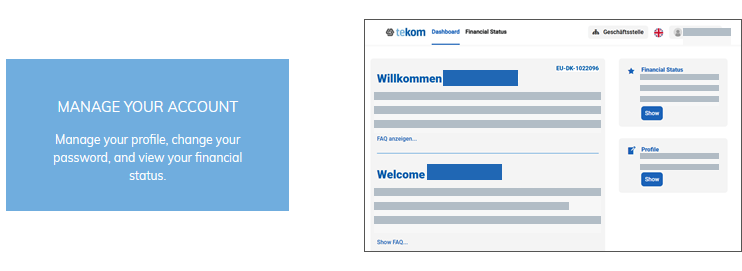
You can maintain your contact details in your profile on the tekom portal.
- Log in to ‘my tekom’.
- Click the tile Manage Your Account. The tekom portal page will open in a second tab or a new window.
- In the Profile section, click Show. A page with your stored addresses will be displayed.
- Click the pencil icon to edit the data for the respective address.
Your “Member Address” is your personal address for membership purposes.
If a different invoice address has been created for you, you will also see the invoice address. If an invoice address is available, it will be used for membership fee invoices.
The administrative office can create an alternative invoice address for you.
Invoice addresses can be deleted only by the administrative office.
On the tekom portal, you can manage your account, change your password, and download future membership invoices from 2026 onwards.
No, but you can find the conference invoices in the order overview for the conference.
Important: This function is under revision and is currently unavailable.
From 2026, all contribution invoices for tekom will be issued in ZUGFeRD format (Central User Guide of the German Electronic Invoice Forum). The invoice format combines the PDF invoice with an XML file that is also readable by machine systems and can be processed automatically.
You cannot view the financial status for company or university membership yet. This feature is currently being programmed.
If you have administration rights, you can change the address and invoice address for your company or university.
Under construction: Address management is being migrated to the new system. We will inform you as soon as you can maintain the data.
If you have administration rights, you can manage members and contact persons for your company or university membership.
Under construction: Company membership management is being expanded so that you can more easily exchange members and roles in the future. We will inform you as soon as this feature is available.
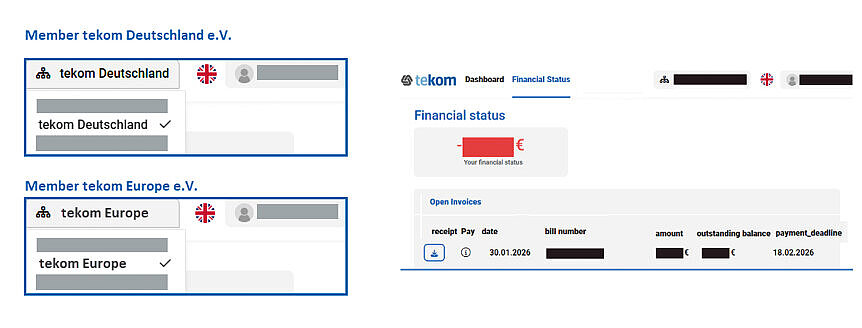
At the tekom portal you can see the finance status of your payment. The invoice for your membership fee also is shown.
Note for company and university membership: If you are a member through a company or university membership, the membership fee invoice will be shown at the account of the company or university. You will not see the membership fee invoice in your personal financial status.
Tip: Depending on your association membership, your membership fee invoice will be assigned to either tekom Deutschland or tekom Europe.
How to get there:
- Log in at tekom.eu or technical-communication.org.
- Open the page my tekom.
- Click on the tile Manage my Account. The tekom portal is shown as a new tab.
- Click on Geschäftsstelle on the top right corner. The menu opens.
- Select your association entry.
- Click on Show at area finance status. Your finance status of the association is shown.